A 12 GB card ran Qwen3.8-27B at 5.7 tok/s with 28 layers on the CPU
The engine fit the model to the card on its own, left 28 of 66 layers in RAM and returned the answer with nothing said. The same file on a 32 GB card ran at 81.5 tok/s.
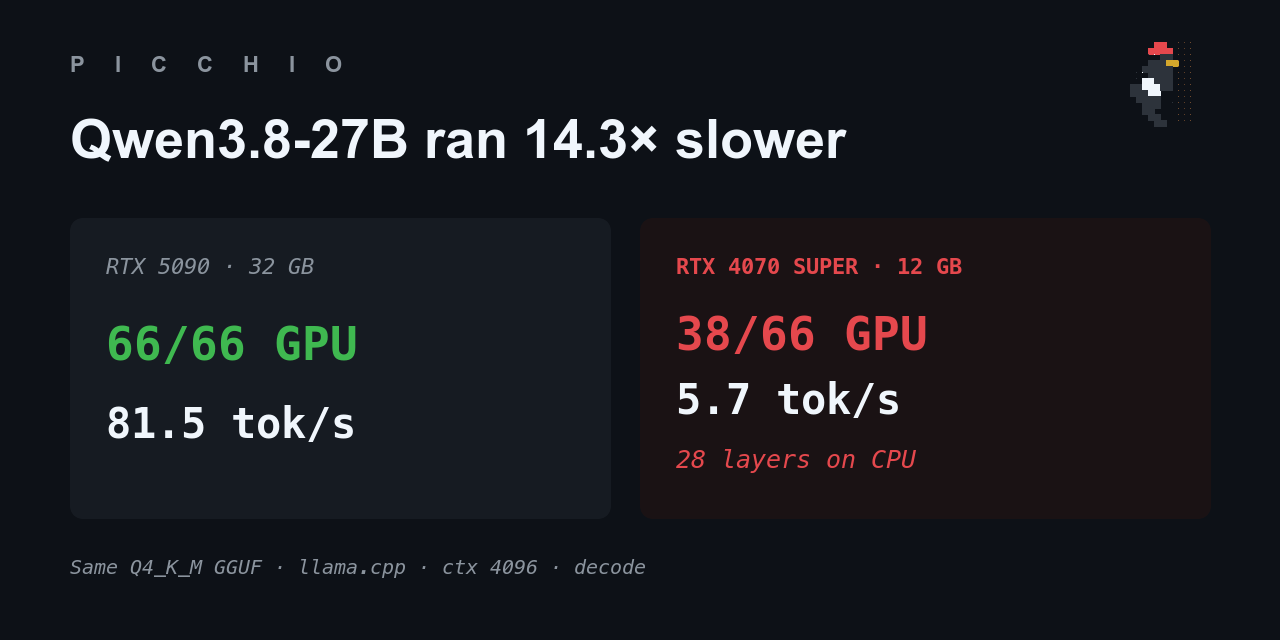
If you have a 12 GB card and you have been looking at Qwen3.8-27B on Hugging Face this week, the question is whether the card can run it. It can. On an RTX 4070 SUPER the Q4_K_M file loaded, took a 774-token prompt, wrote 127 tokens and returned. Decode ran at 5.7 tokens a second. 28 of the model’s 66 layers never reached the card, and nothing in the response said so.
Here is the run, the log lines that explain it, and a rule of mine the same card proved wrong.
What the engine wrote while it loaded
I ran the 27B with no -ngl flag, the way someone who just downloaded it would. The llama.cpp build, b0.2.0-dev, starts like this:
common_init_: fitting params to device memory ...
llama_prepare_model_devices: using device CUDA0 (NVIDIA GeForce RTX 4070 SUPER) - 11069 MiB free
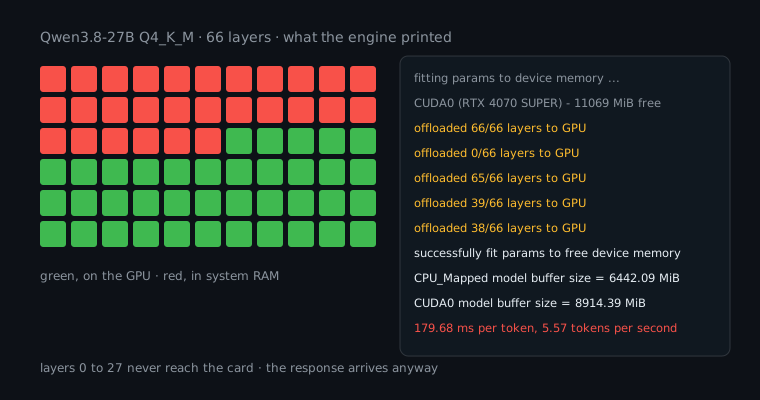
The card has 12282 MiB and 11069 of them were free. The file is 15.32 GiB. The engine then tried to load the model five times in a row. I found one line per attempt in its stderr:
load_tensors: offloaded 66/66 layers to GPU
load_tensors: offloaded 0/66 layers to GPU
load_tensors: offloaded 65/66 layers to GPU
load_tensors: offloaded 39/66 layers to GPU
load_tensors: offloaded 38/66 layers to GPU
common_fit_params: successfully fit params to free device memory
Those first five loads allocate nothing. They are the engine searching for a layer count that fits. The sixth load is real:
load_tensors: offloaded 38/66 layers to GPU
load_tensors:   CPU_Mapped model buffer size =  6442.09 MiB
load_tensors:        CUDA0 model buffer size =  8914.39 MiB
8914 MiB of weights went to the card and 6442 MiB stayed mapped in system RAM. Layers 0 through 27 were the ones assigned to the CPU. Then the prompt went through at 445 tokens a second and generation ran at 179.68 ms per token, which the engine itself reports as 5.57 tokens a second, and the run finished normally.
Picchio reads that stderr while the engine loads, samples the GPU through NVML while it generates, and prints one block:
model    Qwen3.8-27B Q4_K_M, 27.32 B, 15.32 GiB, llama.cpp b0.2.0-dev
gpu      PARTIAL: 38/66 layers on GPU (CUDA: GeForce RTX 4070 SUPER)
os       gpu idle 0%, work 30%, mem +9.7 GiB, 36.1 W, 6.18 J/tok
settings temp 1.0, top-k 20, top-p 0.95, min-p 0.05, seed 7
ctx 4096         prefill         decode      wallclock
  cold       425.3 tok/s      5.8 tok/s      1.7 tok/s
  warm mid   504.1 tok/s      5.7 tok/s      4.0 tok/s
  warm span      445~563        5.6~5.8        3.9~4.2
where the cold pass went (73.6 s, 8/16 threads)
  load weights   46.8 s  ##################..........   64%
  prefill         1.8 s  #...........................    2%
  decode         21.9 s  ########....................   30%
  engine misc     3.0 s  #...........................    4%
VERDICT: PARTIAL OFFLOAD. 28 layers sat on CPU.
WHY: memory fit: saw 11069 MiB free, gave 38/66 layers
The GPU worked 30% of the time and drew 36 W. It was waiting on the 28 layers in RAM.
The same card, and the same file elsewhere
The card is not slow. The same card ran Qwen3.5-9B Q4_K_M with all 33 layers on the GPU at 4187.8 tok/s prefill and 78.2 tok/s decode, with the GPU at 97% and 114 W. The 27B file is not slow either. On an RTX 5090 with 32 GB it loaded 66/66 and decoded at 81.5 tok/s. 81.5 divided by 5.7 is 14.3.
That is the cost of the 28 layers, and the reason for it sits in one log line most people never open, because the answer arrives either way.
If you own the 12 GB card, the number to keep is the one in the WHY line. The engine had 11069 MiB to work with and the weights alone are 15,688 MiB. Any file that is going to run with every layer on that card at 4k context has to be smaller than the free figure with room left for the KV cache and the compute buffer, and the engine prints that free figure at the top of every load, so you can do the subtraction before you download a second 15 GB file.
The rule I had to delete
The same card also ran the 9B with -ngl 0, the forced case where zero layers go to the card. The block came back correct, SILENT CPU FALLBACK, decode 9.5 tok/s. Then my own verify command flagged the block as a contradiction. Prefill was 1010.7 tok/s, 106 times decode, and I had written a rule saying a CPU run never reaches a ratio like that.
The log said otherwise:
load_tensors: offloaded 0/33 layers to GPU
sched_reserve:      CUDA0 compute buffer size =  1361.08 MiB
With zero weight layers on the card, the CUDA build still put a 1361 MiB compute buffer there and ran the prompt through it. Prefill is compute-bound, so it ran fast on the card. Decode is bound by memory bandwidth, so it stayed on the CPU with the weights and stayed slow. The layer count says where the weights are and the ratio says where the arithmetic ran, and I had been treating the two as the same thing. I deleted the rule. The OS meter does that job now, and the source carries a note with these two readings so nobody adds it back.
Ollama does the same fit at long context
This is not a llama.cpp habit. I loaded Qwen3.6-35B-A3B in Ollama 0.31.1 with the same prompt on a 32 GB Apple M5, once at 4k context and once at the model’s full 262k. Both requests returned HTTP 200.
| context | placement | prefill | decode |
|---|---|---|---|
| 4,096 | 100% GPU | 756.0 tok/s | 33.5 tok/s |
| 262,144 | 9% CPU / 91% GPU | 353.3 tok/s | 24.4 tok/s |
At 262k, ollama ps showed the loaded model at 28 GB instead of 22 GB with 9% of it on the CPU, prefill fell 2.1x and decode fell 1.4x. picchio guard ollama --for 2 printed PARTIAL OFFLOAD two seconds after I pointed it at the running server.
At 262k context, prefill swung between 142 and 353 tok/s across identical runs minutes apart, while the two 4k runs landed 0.3% apart. With 28 GB of model on a 32 GB machine, the unified memory was fighting for room, and prefill, which streams every weight, is where that shows.
Run it
curl -fsSL https://raw.githubusercontent.com/logxio/picchio/main/public/picchio.pyz -o picchio
chmod +x picchio
./picchio
On Windows, in PowerShell:
curl.exe -fsSL https://raw.githubusercontent.com/logxio/picchio/main/public/picchio.pyz -o picchio.pyz
python picchio.pyz
Point it at the file you just downloaded, or at the server that is already running:
./picchio Qwen3.8-27B-UD-Q4_K_M.gguf
./picchio guard ollama
./picchio MODEL --ctx 262144 --share bug-report > issue.md
It is one file, Python 3.9 or newer, standard library only, and it runs on macOS, Linux and Windows with llama.cpp and Ollama. Every run in this post, plus the same files on a 4090 and a 5090, is on the results page.
Send me the weird run
./picchio MODEL --share row > result.md 2> picchio.txtIf your 12 GB or 16 GB card gives a different layer count for this file, add the row. Star it if the block caught something you missed. If Picchio calls your run wrong, send me that one first; the verify rule above came out of exactly that kind of block.